Skip to content

šŸ“ Blog

Gary - Little 1

In those months, apart from kids and work, I started to play with a lot more electronics and robotics things.

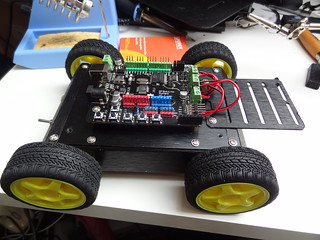
The first thing I’d like to show you is my mobile platform.

base montƩe et cablƩe

Nice, isn’t it ? ;)

As I wanted to dig a little deeper in robotics world, I needed 2 things:

  • a long term goal, some dream project that I don’t know if it’s doable, no planning and such
  • sub goals of short projects that will help me in the larger picture.

In a far far away future, I’d like to have a mobile robot wandering in the house (ooops, stairs :) ) avoiding obstacles and able to launch an alert in case of unwanted presence (picture snapshot? video stream?).

And I lied… I have a second long term project, something already done by others: a Pixar Luxo lamp with minimal facial recognition and IA behaviours.

To achieve those goals, I decided to run little experiments in the meantime.
(yes, that’s the blog title and purpose ;) ) (note: at that time, the blog was called Little Experiments)

What I already started:

  • a simple 4WD robot
  • learn or remember electronics ;)
  • a webcam on a pan/tilt that I can control from computer
  • learn to use OpenCv
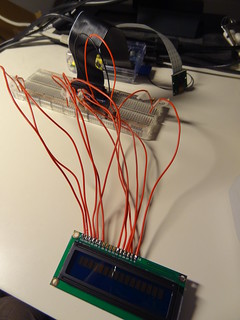
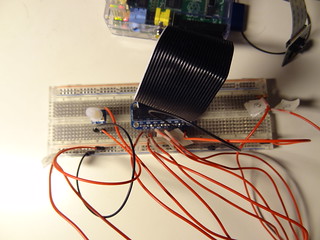
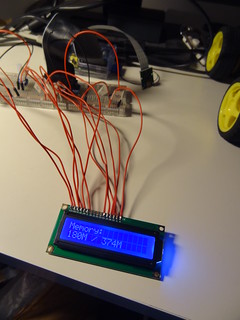
  • control a 2 lines LCD from my Raspberry

What is planned:

  • add IR and/or ultrasonic sensor to implement obstacle avoidance
  • control a 2.8ā€ touch screen from Pi and/or the Arduino
  • add JY-MCU to Arduino and have communication with a computer
  • control the Arduino from the Raspberry
  • stream video from the Pi to a computer

What is just in my mind:

  • experiment with plastic polymorph
  • build some quadri or hexa pod
  • play with 2.4Ghz R/C transmitter/receiver

That’s a lot and I’ll go deeper in each of those in later, but closer, blog posts.

As the subject of this post was Gary, I’ll finish with little details on it.

It is based on a DFRobot kit called 4WD Mobile Platform
The brain is a compatible Arduino board with motor bridge already on it called Romeo

I took some pictures during the assembly of the kit.

If french is not a problem, I had some details already in a forum where I got help.

This remind me that I need to push everything in a nice project page on Let’s make robots

As I already started to play with it, expect a IR sensor on Gary very soon. Next I’ll add the ultrasonic I just received.

See ya!

Why Golo ?

As I only receive emails and no comments, I have to post some explanations here ;)

When I first heard of Golo, I didn’t needed a new language. At least, I was satisfied with my daily use of Java or Groovy.

Then a little twitt from Julien Ponge mentionned something coming, something that will be linked to the JVM, something called… Golo

Because I already knew a little bit this crazy man who love explaining black magic voodoo with JVM bytecode, I decided to look at it.
It could have stopped there. The official release was planned in a few month ahead and I will wait.

Wait? Philippe CharriĆØre couldn’t ! He started to ask for an early release.
It looks funny, so I followed him, saying all the wonderful things to try with this language I didn’t knew :)

That’s how I became a beta tester of Golo, coding a http server and chatting with people writing framework with Golo for fun!

Maybe I didn’t accomplish huge things as Fast framework or Graddle plugin, but I already had great moments.

For sure, I learn every day new things.
Using Golo pushed me to question myself.
For example, as I discovered Java and object languages on the field, I never took time to look at the concepts behind. Trying to understand something with Golo bring me to a moment of thinking on inheritance versus composition.

Believe me: give a try to new languages! You will learn new ways of coding, thinking and having fun!

This article is in fact a lame excuse to thanks Julien and Philippe at least: thanks mates to give me such enthusiastic moments!

Golo - Little 5

Ok! That’s time to sync everyone on the state of GoloHttpServer.
First of all, I created a GitHub for this and you’re more than welcome to contribute, ask questions or even just talk about it.

This will allow you to take a look at the implementation of the run function which handle the Http request and response.

function run = |connectedClient, serverState| {

  let inFromClient = BufferedReader( InputStreamReader (connectedClient:getInputStream()))
  let outToClient = DataOutputStream(connectedClient:getOutputStream())

  let requestString = inFromClient:readLine()
  let headerLine = requestString

  let tokenizer = StringTokenizer(headerLine)
  let httpMethod = tokenizer:nextToken()
  let httpQueryString = tokenizer:nextToken()
  let responseBuffer = StringBuffer()
  responseBuffer:append("<b> This is the HTTP Server Home Page.... </b><BR>")
    responseBuffer:append("The HTTP Client request is ....<BR>")

    while (inFromClient:ready()) {
        # Read the HTTP complete HTTP Query
        responseBuffer:append(requestString + "<BR>")
      requestString = inFromClient:readLine()
  }

  httpMethodHandle(httpMethod, httpQueryString, responseBuffer, outToClient)
}

As you can see, I lied a bit: the run function is just here to prepare all the needed element to delegate to httpMethodHandle.
The input and output buffers are initialized, the query is tokenized and everything is set to httpMethodHandle function.

function httpMethodHandle = |methodName, queryString, responseBuffer, outToClient| {
  case {
      when methodName == "GET" {
          var fileName = queryString:replaceFirst("/", "")
          if (queryString=="/") {
              # The default home page
              fileName = Parameters(): HOME()   
          }
          fileName = URLDecoder.decode(fileName)
          if ( File(fileName):isFile()){                              
              sendResponse(200, fileName, true, outToClient)
          } else {
              sendResponse(404, "<b>The Requested resource not found ...." + "Usage: http://127.0.0.1:5000 or http://127.0.0.1:5000/<fileName></b>", false, outToClient)
          }    
      }
      otherwise {
          sendResponse(404, "<b>The Requested resource not found ...." + "Usage: http://127.0.0.1:5000 or http://127.0.0.1:5000/<fileName></b>", false, outToClient)
          }
      }
}

This method has a simple goal: analyze the resource name asked and return the appropriate content.
Note the use of case..when..otherwise Golo statements.
This is quite useful isn’t it ?

From here, I’ll try to use GoloHttpServer for side projects.
For example, during MixIT 2013, I attended a conference on the Dart language.
Serve HTML pages and javascripts ? That may be doable with GoloHttpServer ;)

As usual, I’m waiting your emails and comments.
Don’t be shy and drop me an email as the other little hackers that prefers that to public comment! As of today, everyone had my answers ;)

Why? Oh Why?

For 2 days, it’s MixIT 2013 days!
This conference has a lot of qualities, but for me, it’s THE event that helped me surviving previous years.

This may sound a bit too much, but believe me: I was and still am a true geek!
I like technology, I like computers, I like science… and I like to share!
But when you work in a company that prevent you from any innovation, where every technical act is surrounded by political thoughts, you’re stucked.
Being stucked in your brain is not a very pleasant situation…

Going to MixIT was a break in those sad moments, this place was full of people with knowledge and the will to share.
There were hard moments when people were laughing on old technologies and working methods: this was my daily tools and environment!
But this was the opportunity to meet and exchange ideas with passionnate peoples.
After the first MixIT, I stopped trying to push Groovy in the product I was working on: instead, I just had to do it :)
After the second year, I decided to look for a new job: I found one in the month after!

Yes, MixIT is brighter, stronger and clean your clothes better! ;)

This year is even better: I love my job, I love my company and I even use some of technologies shown here as innovatives ;)

So, thanks MixIT, thanks all the people behind this event!
Long live to MixIT!

PiG 2 - First Interaction

In my previous article I explained some steps useful for my Little Experiment with my Raspy.
Yes, I gave it a name, I’m stupid and geek ;)

This time I’ll explain my first usage of Golo to control the GPIO of my Raspy.
If you didn’t prepared your Raspy for Golo usage, just follow my article.
All those previous articles looks like I prepared something ? ;)

When you have the hardware and software ready, we can jump on the next step: light a LED! ;)

First, connect the cobbler breakout to the Raspy and the breadboard.
It will allow multiple future experiments without more soldering.

The long boardBoard and cable

Prepare a LED. I chose a red one, some K2000 reminiscence ;)
The resistor is here to limit the current allowed through the LED.
If you want further explanation on this, you can read Gordons projects page or the Pi4J corresponding page.

hardware for first projectclose view of LED and resistor

Start by pinning an orange cable to pin marked #18. It is the GPIO1 pin.
Use then a green cable to pin the GND pin.

Orange on pin #18, Green on GND

Put a resistor and then a LED:

put the resistor and the LED

Don’t forget to close the circuit:

close the circuit

From now, you have everything to run the first sample from the Pi4J project.
First, follow their instructions to download and setup the library
Check that the control sample in Java is working.

If you saw the LED switching on and off, you’re just one step ahead of this article goal.
You have the hardware, you have the Java sofware.

But wait… where’s the Golo software ? :)

Oh, look! Here!

module PiG.gpio.control

# adapted from http:#pi4j.com/example/control.html
# which is
# Copyright (C) 2012 - 2013 Pi4J
# Licensed under the Apache License, Version 2.0 (the "License")
#
# Golo version by Thierry Chantier
# Copyright (C) 2013 Pi4J
# Licensed under the Apache License, Version 2.0 (the "License")

import com.pi4j.io.gpio.GpioController
import com.pi4j.io.gpio.GpioFactory
import com.pi4j.io.gpio.GpioPinDigitalOutput
import com.pi4j.io.gpio.PinState
import com.pi4j.io.gpio.RaspiPin

import java.lang.Thread

#
# This example code demonstrates how to perform simple state
# control of a GPIO pin on the Raspberry Pi.
#
# @author Robert Savage (original java version)
# @author Thierry Chantier (Golo-lang version)
#

function main = |args| {

        println("<--Pi4J--> GPIO Control Example ... started.")

        # create gpio controller
        let gpioInstance = GpioFactory.getInstance()

        # provision gpio pin #01 as an output pin and turn on
        let pin = gpioInstance: provisionDigitalOutputPin(RaspiPin.GPIO_01(), "MyLED", PinState.HIGH())
        println("--> GPIO state should be: ON")

        Thread.sleep(15000_L)

        # turn off gpio pin #01
        pin: low()
        println("--> GPIO state should be: OFF")

        Thread.sleep(1000_L)

        # toggle the current state of gpio pin #01 (should turn on)
        pin: toggle()
        println("--> GPIO state should be: ON")

        Thread.sleep(15000_L)

        # toggle the current state of gpio pin #01  (should turn off)
        pin: toggle()
        println("--> GPIO state should be: OFF")

        Thread.sleep(5000_L)

        # turn on gpio pin #01 for 1 second and then off
        println("--> GPIO state should be: ON for only 1 second")
        # set second argument to 'true' use a blocking call
        let duration = 1000_L
        pin: pulse(duration: longValue(), true)

        # stop all GPIO activity/threads by shutting down the GPIO controller
        # (this method will forcefully shutdown all GPIO monitoring threads and scheduled tasks)
        gpioInstance: shutdown()
}

My project is now going well. I’m starting to convert to Golo every sample from Pi4J and give them back as a contribution.
I hoped to have enough time to show a full video of all the process, but it was quicker to do this article.

If you have any question, feel free to comment or to drop me an email.